Config Backups
What is it?
To improve the speed of system recovery, this script backs up the winget installed packages export. This can be used to restore the systems software in a disaster recovery scenario.
Setup
Installing NasBackup Util
The config is backed up onto TrueNas here:
In the event of a disaster, the following steps should be taken:
Restore Config
Ensure Winget is installed on the new system.
Check Winget is available in powershell with
winget --version
Reinstalling the NasBackup Util
On a fresh install of Windows, reinstall the `nasbackup util`
To build and install, run the following command:
python setup.py installverify the install with
Get-Command nasbackup
Restoring the Config
Reinstall Using the Config file
Map the NAS entry
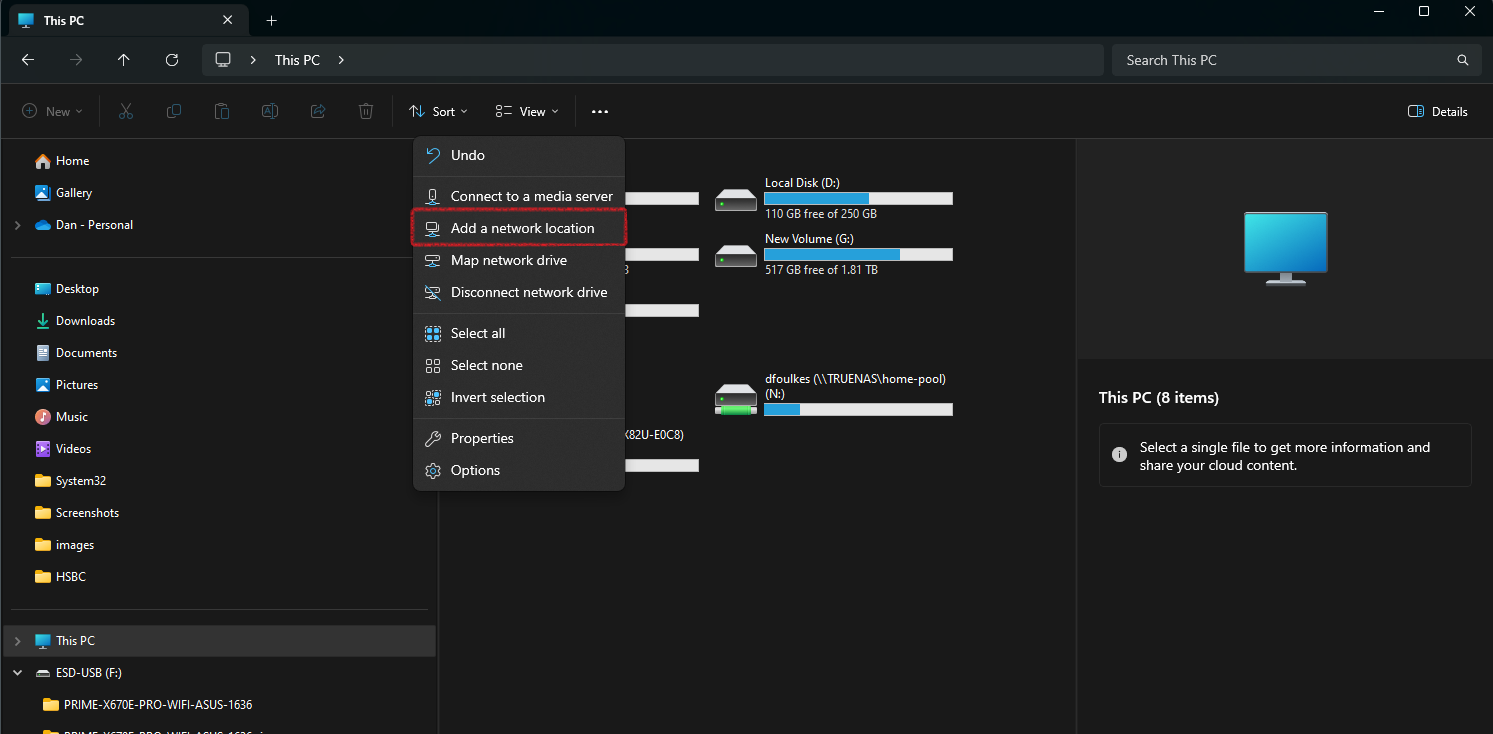
In explorer, click on
...'Add a network folder'Enter the NAS address
\\TRUENAS\home-pool\dfoulkes\winget-backupand select a driver letter, for this example set to N:Click on
FinishOpen Powershell as Administrator
Run the following command:
winget import -i X:\winget-backup\app.jsonWait for the packages to install
Configure Backup Schedule
Schedule
The backup script will run every Sunday at 09:00. The job runs a command called `winget-backup` which is compiled python script. This script is located in the `C:\Users\danfo\AppData\Local\Programs\Python\Python311\Scripts\nasbackup.exe`
Source Code
The source code for this backup can be found on Github dfoulkes/BackupConfigtoNas